Wiring the Digital Inputs
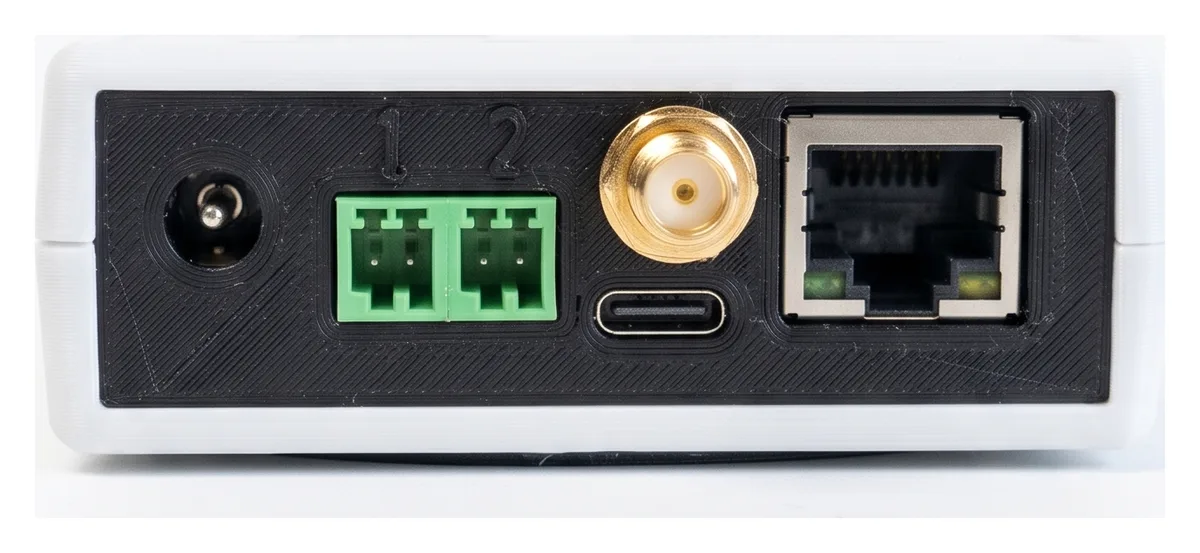
The T-Connect has two digital inputs on the back, the green plugs marked 1 and 2. Wire a signal from the machine into them to track:
- Running time — a signal that is on while the machine runs, such as a cycle lamp or an "in cycle" relay
- Parts — a pulse for every good part, such as an end-of-program M-code or a sensor on the conveyor
- Scrap — a pulse for every rejected part
Each input does one of these jobs. You choose which in the machine's settings, so you can use one input for running time and the other for parts, or both for parts and scrap.
Digital inputs are on S3EEIO units and later. Older units have no green plugs on the back.
The inputs need 24 V to switch
The digital inputs don't supply any voltage of their own. An input turns on when 12–24 V DC is across it (+ on the left pin, − on the right). A plain relay contact wired straight across the two pins will never switch the input on.
To use a dry (volt-free) contact, put it in series with the machine's 24 V supply — see Relay or dry contact.
Each input is isolated from the T-Connect's own supply by an optocoupler, so the 24 V can come from the machine's 24 V supply or from a separate one.
| Input voltage | 12–24 V DC nominal, 30 V maximum |
| On | 12 V or more across the input |
| Current drawn | About 5 mA at 24 V (2.3 mA at 12 V) |
| Off-state leakage ignored | Up to 1.2 mA — enough for most PLC outputs and 3-wire sensors |
| Shortest pulse counted | 30 ms on, then 30 ms off — up to about 15 parts per second |
| Contact bounce | Filtered out — relay contacts are fine |
| Reversed wiring | Doesn't damage the input; it just never turns on |
| Plug | TE push-in, 2-pin, 2.5 mm pitch; 20–28 AWG wire (0.08–0.5 mm²) |
| Isolation | Functional isolation for 24 V signals. Not rated for surges between the field wiring and the unit. |
Don't connect 110/230 V AC, or any voltage over 30 V DC, to the inputs. If the signal you want is in an AC circuit, switch an interposing relay with it and wire that relay's contact as a dry contact.
Find a signal on the machine
All installation tasks must be completed by an authorized, properly qualified and skilled person — see the safety notice in the installation guide. Isolate the machine before working in the cabinet.
Check the machine builder's electrical drawings for a signal you can tap without changing how the machine behaves. Good choices:
| To track | Look for |
|---|---|
| Running time | A spare contact on the "in cycle" or "cycle start" relay, the green stack-light lamp, or a PLC output that is on while the machine runs |
| Parts | A spare M-code output relay, pulsed once at the end of the part program; a parts-catcher or bar-feeder output; or a photoelectric sensor on the conveyor |
| Scrap | A reject-chute sensor or a scrap button that pulses once per rejected part |
Use a spare normally-open (NO) contact, or a contact that is already wired in parallel. Never cut into a safety circuit (e-stop, door interlocks, guarding) or into a circuit the machine relies on to run.
Wire the input
Pick the diagram that matches your signal. Take the 24 V from a fused terminal in the cabinet. If you have both a sensor and a T-Connect on the same 24 V supply, they share its 0 V.
Relay or dry contact
The contact switches the cabinet's +24 V onto the + pin. The − pin goes to the cabinet's 0 V.
- Run a wire from a fused +24 V terminal to one side of the spare contact.
- Run a wire from the other side of the contact to the left (+) pin.
- Run a wire from the right (−) pin to the cabinet's 0 V.
PNP sensor or PLC output
A PNP (sourcing) output switches +24 V onto its output wire when it turns on. Most European sensors and PLC outputs are PNP.
- Power the sensor from the cabinet: brown to +24 V, blue to 0 V.
- Run the sensor's black output wire (or the PLC output) to the left (+) pin.
- Run a wire from the right (−) pin to the cabinet's 0 V.
NPN sensor or PLC output
An NPN (sinking) output switches its output wire to 0 V when it turns on.
- Power the sensor from the cabinet: brown to +24 V, blue to 0 V.
- Run a wire from +24 V to the left (+) pin.
- Run the sensor's black output wire (or the PLC output) to the right (−) pin.
Brown, blue and black are the standard colours for 3-wire DC sensors (IEC 60947-5-2). Check the sensor's datasheet if yours are different.
Make up the plug
- Strip the wire end. Use a bootlace ferrule on stranded wire.
- Push the wire into the plug until it seats.
- Tug each wire to check it's held.
- Push the plug into input 1 or 2 on the back of the T-Connect.
- Tidy the wires so nothing pulls on the plug, and keep them away from the spindle and axis power cables.
Tell TrackMyMachines what's wired
Each input reports nothing until you tell it what it's for.
- Go to Manage → Machines and edit the machine.
- Open Digital inputs.
- For Input 1 (left) and Input 2 (right), choose what's wired:
- Off — nothing is wired to this input
- Running signal — on while the machine runs. The machine counts as running when this signal is on or a current clamp is over its threshold.
- Parts — each pulse is one good part
- Scrap — each pulse is one rejected part. Total parts are good plus scrap, so wire a Parts input next to it to a signal that counts good parts only.
- For a running signal, choose Signal:
- On while running — most run signals and cycle lamps
- Off while running — a "stopped" or "fault" signal, which is on when the machine isn't running
- Save. The settings are sent to the T-Connect.
Check it works
- Turn the machine back on.
- Make the signal happen: start a cycle, run the M-code, or pass a part in front of the sensor.
- Check that the machine shows as running, or that the part count goes up, in TrackMyMachines.
Troubleshooting
| Problem | Likely cause |
|---|---|
| The input never turns on | No 24 V in the circuit: a volt-free contact has been wired straight across the pins. Wire it as in Relay or dry contact. |
| The input never turns on | Wires reversed: + must be on the left pin. |
| The input never turns on | The input is set to Off in the machine's settings. |
| The input is always on | The sensor or PLC output leaks more than 1.2 mA when off (common with 2-wire proximity sensors). Use a 3-wire sensor, or fit a bleeder resistor across the input — contact support. |
| Running time is upside down | The signal is on while the machine is stopped. Set Signal to Off while running. |
| Parts are missed | Pulses are shorter than 30 ms, or closer together than 30 ms. Lengthen the M-code dwell, or use a slower sensor output setting (off-delay). |
Need help?
Email support@trackmymachines.com with a photo of the cabinet terminals and the machine's electrical drawings, and we'll help you find a signal.